GP to Business Central: What to Migrate, What to Redesign, and What to Leave Behind
Migrating from Dynamics GP to Dynamics 365 Business Central is not a lift-and-shift. The two systems share conceptual roots, yet their data models, development frameworks and operational designs differ enough that copying everything creates lasting performance and maintenance problems. Successful projects treat the move as a selective redesign: they transfer what the business needs on day one, reshape structures that no longer serve them, and deliberately archive or retire the rest.
Microsoft’s cloud migration tooling supports GP 2015 and later. It can move core master data, open transactions and configurable historical balances. It does not move customisations, most reports, payroll, full fixed-asset detail or third-party ISV data. Those boundaries should drive every decision about scope.
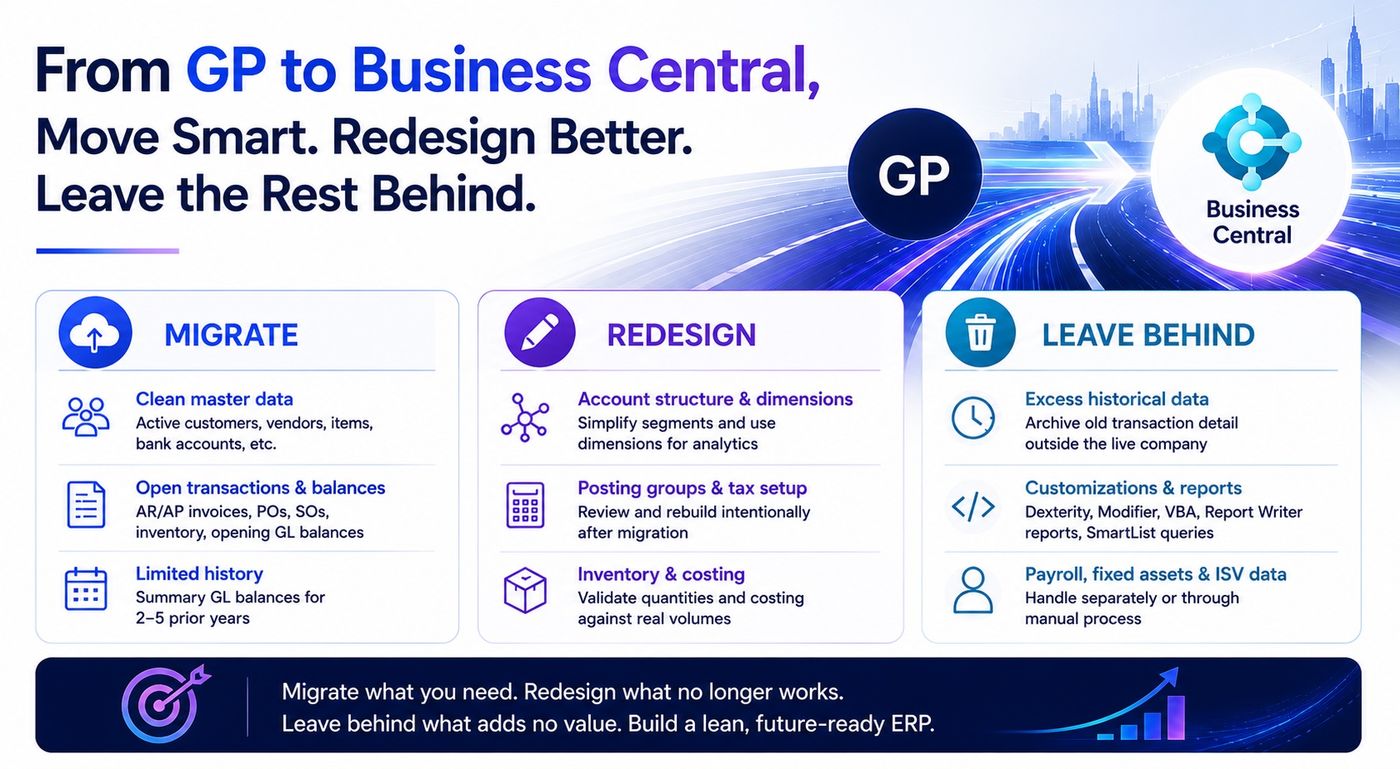
Move smart. Redesign Better. Leave the rest behind
Core Principles
Three rules keep the migration focused:
- Bring only data required for day-one transactions and near-term reporting.
- Protect system performance by excluding inactive records and excess history.
- Meet audit and compliance needs through accessible archives, not by loading everything into the live company.
These principles create a clear split between what belongs in Business Central and what does not.
What to Migrate
Chart of Accounts and General Ledger
Map the main GP account segment to the Business Central account number. Convert remaining segments into Global Dimensions (two) and Shortcut Dimensions (up to eight). Do not copy old segmented strings. Redesign the structure so dimensions carry the analytical load. Fiscal periods migrate as accounting periods; historical years arrive open and must be closed after final adjustments.
Cleaned master data
- Active customers and vendors (exclude inactive records where possible)
- Items, including quantities, costing method, and serial or lot detail where supported
- Bank accounts
- Payment terms, shipping methods, locations and basic setup
- Customer, vendor and item classes (these become posting groups and need review)
- Vendor 1099 data
Cleanse first. Remove duplicates, deactivate obsolete records and resolve address or tax issues. Dirty masters multiply problems later.
Open transactions and balances
- Open AR and AP invoices with remaining amounts and aging
- Open purchase orders (ordered, received, invoiced and remaining quantities)
- Open sales orders where still relevant
- Opening GL balances for the current and prior fiscal year, reconciled to the final GP trial balance
These records let finance and operations continue without interruption.
Limited historical data
Use the Oldest GL Year setting to bring summary balances for two to five prior years. Full line-level history for every year is rarely required in the live company. Deeper history can sit in extension tables for Power BI or in an external archive.
What to Redesign
Some elements transfer technically but should not be treated as finished.
Account structure and Analytical Accounting become dimensions. Map segments deliberately, simplify where the old design was overly complex, and rebuild posting groups and posting setup with intention.
Posting groups and tax configuration often arrive incomplete. Plan a thorough review after the automated load.
Inventory quantities and basic costing methods migrate, yet layers (especially standard cost) require validation against real volumes.
What to Leave Behind or Archive
Excess historical transaction detail
Ten or twenty years of every posted invoice, payment and journal entry inflate the database, slow lists and raise cost. Archive older detail in a read-only GP instance, Azure Data Lake or a reporting database. Keep only the summary balances needed for year-over-year comparatives and statutory requirements.
Inactive master records
Do not migrate every customer or vendor ever entered. Use active-only options and additional cleansing. Dormant records clutter search and create ongoing data quality debt.
Dexterity, Modifier and VBA customisations
These do not transfer. Business Central uses AL extensions. Inventory every customisation, check whether standard functionality or an AppSource app already covers the need, and rebuild only what is truly unique.
Report Writer reports and SmartList queries
Neither migrates. Rebuild critical reports in native Business Central reporting or Power BI. Eliminate reports that no one uses.
Payroll
The migration tool has no direct path. Plan a separate solution: a third-party provider or a Business Central payroll extension from AppSource.
Fixed assets
Not migrated by the standard tool in most versions. Convert asset masters, depreciation books and accumulated values through a controlled manual or scripted process and validate net book values carefully.
Manufacturing, project and service detail
Core financial and inventory data can move, but BOMs, routings, production orders and project history often need extra work or ISV solutions. Assess actual usage before deciding scope.
Third-party ISV data and uncleared bank transactions
These sit outside the tool. Extract and re-import separately, or enter bank edge cases manually after the main load.
Practical Decision Framework
For every major data category ask:
- Will users post new transactions against this data on day one or within the first 90 days?
- Can regulatory or audit needs be met outside the live ERP?
- Does bringing the data into Business Central improve or degrade performance and maintainability?
If the answer to the first is no and the second can be satisfied by an archive, leave it out of the live company.
Execution Notes
- Run multiple test migrations into a sandbox. Validate trial balances, AR/AP aging, inventory quantities and open-order status against GP source reports after each run.
- Keep GP available in read-only mode for a defined period after cutover.
- Treat dimensions, posting groups and number series as design decisions, not automatic mappings.
- Sequence the work: master data and setup first, open transactions next, limited history last. Validate each stage before proceeding.
How Aventiqo Helps
Aventiqo specializes in legacy exit and migration from GP (and NAV, SL or AX) into Business Central. The engagement begins with a fixed-fee assessment and fit-gap that identifies precisely which modules, customizations and data sets should transfer, which should be redesigned, and which should be archived or retired. Dimension and data-model mapping is treated as a deliberate redesign. AI-assisted code archaeology accelerates disposition of Dexterity and other legacy customizations. The same team that runs the migration also owns the surrounding Azure infrastructure, Fabric data model and agent layer, so the result is a cleaner, faster Business Central environment ready for ongoing managed services and process improvement.
A migration that brings only what is operationally required, redesigns structures that have outlived their usefulness, and deliberately archives the rest produces a leaner, more maintainable system. Moving everything “just in case” simply transfers technical debt into a new platform.
Sources
Microsoft